

Cloud GPS Tracking vs Offline Tracking: How Do They Differ?

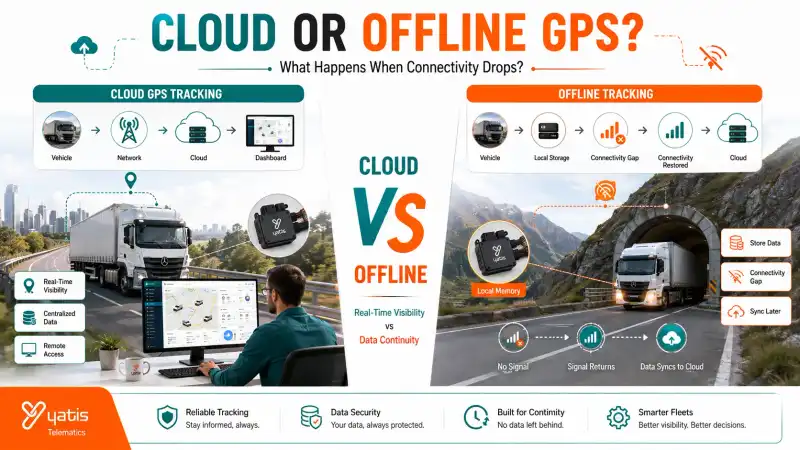
Modern GPS tracking systems do more than determine where a vehicle is. They also need to collect, transmit, store, process, and present location data. This creates an important distinction between cloud GPS tracking and offline tracking.
A cloud-based system continuously sends available vehicle data to a remote platform, allowing fleet managers to access information through a dashboard or application. Offline tracking takes a different approach when communication is unavailable: instead of immediately transmitting every data point, the tracking device retains information locally and transmits it later when connectivity is restored.
Quick Takeaways
- Cloud tracking centralizes vehicle data
- Cloud platforms enable remote dashboard access
- Offline capability helps preserve data during communication gaps
- Offline does not mean the vehicle has no GPS positioning
- Store-and-forward systems can upload retained data after connectivity returns
- Cloud and offline capabilities can work together
Comparison Snapshot
| Factor | Cloud GPS Tracking | Offline Tracking |
|---|---|---|
| Primary Function | Centralized data access | Data continuity during connectivity gaps |
| Data Location | Remote cloud platform | Local device storage |
| Real-Time Visibility | Yes, when connected | No live remote visibility during outage |
| Local Data Storage | May be used as part of system architecture | Core capability |
| Connectivity Required for Remote Access | Yes | Yes |
| Works During Communication Gap | Data may stop reaching platform | Data can continue being recorded locally |
| Synchronization | Continuous / near real-time | After connectivity returns |
| Best For | Continuous fleet visibility | Areas with intermittent connectivity |
The important point is that cloud and offline tracking are not necessarily competing technologies. A robust tracking architecture can use both. This is particularly relevant for vehicles operating through tunnels, remote areas, network dead zones, underground locations, and areas with intermittent cellular coverage.
What Is Cloud GPS Tracking?
Cloud GPS tracking is a system in which vehicle location and telematics data are transmitted to a remote cloud platform for storage, processing, visualization, and access. Fleet managers can typically view available vehicle information through web or mobile interfaces from different locations.
The basic architecture can be represented as: Vehicle → GPS/Telematics Device → Cellular Network → Cloud Platform → Dashboard.
The tracking device collects relevant information and sends it through an available communication network. The cloud platform then receives and processes that information, and fleet managers access the resulting data through connected interfaces.
Centralized Access
This architecture provides a major operational advantage. Instead of keeping tracking information on an individual vehicle or local computer, data can be made available through a centralized platform accessible to multiple authorized users.
How Cloud GPS Tracking Works
Cloud GPS tracking works by collecting vehicle data through a tracking device, transmitting it over a communication network, processing it on a remote platform, and making the resulting information available through a dashboard or application. A simplified data flow looks like this:
Step 1 — Data Collection
The tracking device determines location and may collect other supported vehicle information.
Step 2 — Data Transmission
The device sends the information through its available communication connection.
Step 3 — Cloud Reception
The cloud platform receives the transmitted data.
Step 4 — Processing
The platform processes and organizes the incoming information.
Step 5 — Visualization
Fleet managers access the information through a dashboard, application, reports, or alerts.
Related Reading: For a deeper explanation of the underlying tracking process, see How Does a GPS Tracking System Work?
What Is Offline GPS Tracking?
Offline GPS tracking allows a tracking device to continue recording location data when communication with the remote platform is temporarily unavailable. The device stores the information locally and can transmit the accumulated records once connectivity is restored. This is sometimes called store-and-forward tracking.
The concept is straightforward: Collect → Store Locally → Connectivity Restored → Upload → Synchronize.
For example, imagine a vehicle travelling through an area where cellular communication temporarily disappears. The GPS receiver can continue determining the vehicle's position, but the device cannot immediately send that information to the cloud. A tracker with local storage retains the relevant records and transmits them once communication becomes available again.
Offline Tracking Does Not Mean "GPS Without Satellites"
This distinction is critical. GPS positioning and data communication are separate functions. A tracking device can determine its position using satellite-based positioning while temporarily lacking the communication connection required to send that information to a remote server.
A communication outage does not automatically mean that the device cannot determine its location. It means the information may temporarily be unable to reach the cloud platform. This is why offline capability is primarily about data continuity, not about replacing GPS positioning.
Why Connectivity Matters in GPS Tracking
Cloud tracking depends on communication between the vehicle and the remote platform. When that connection is unavailable, the dashboard cannot receive new data in real time. Possible causes include:
- Cellular dead zones
- Tunnels
- Underground areas
- Remote regions
- Temporary network outages
- Network handovers
A well-designed offline-capable tracker reduces the impact of these interruptions by retaining data locally. The temporary loss of connectivity does not necessarily result in permanent loss of the journey record.
Cloud GPS Tracking Architecture
Cloud GPS tracking uses a connected architecture in which vehicle data moves from the tracking device through a communication network to a remote cloud platform. The cloud platform stores and processes the data, making it available through dashboards, reports, alerts, and applications. Each layer has a different role:
1. Tracking Device
Collects location and supported vehicle information.
2. Communication Network
Transmits the collected information from the vehicle to the remote platform.
3. Cloud Platform
Receives, processes, and stores the data.
4. User Interface
Makes the information accessible to fleet managers through dashboards, applications, reports, or alerts.
The key advantage is that the data is not restricted to the vehicle itself. Authorized users can access the platform remotely.
Offline GPS Tracking Architecture
Offline GPS tracking uses local storage within the tracking device to retain location records when communication with the remote platform is unavailable. Once connectivity returns, the device can transmit the stored records to the platform for synchronization.
The architecture becomes: Vehicle → GPS/Telematics Device → Local Memory → Connectivity Restored → Cloud Platform → Dashboard.
The critical difference is what happens when the communication connection is interrupted. Instead of discarding every location record generated during the outage, an offline-capable device retains those records locally. This is commonly referred to as store-and-forward.
What Happens When Network Connectivity Is Lost?
When network connectivity is lost, a cloud-connected GPS tracker may temporarily stop sending new information to the remote dashboard. An offline-capable tracker can continue recording supported location data locally and transmit the stored records after communication is restored.
Without Offline Data Storage
The cloud platform may stop receiving new information during the communication interruption, and the manager sees a gap in the vehicle's journey.
With Offline Data Storage
The tracking device continues collecting supported location records. The sequence becomes: Network Lost → Location Data Recorded Locally → Vehicle Continues Journey → Network Restored → Stored Data Transmitted → Cloud Records Updated.
This helps preserve the historical journey even when continuous communication was temporarily unavailable.
Real-Time Visibility vs Historical Recovery
The major strength of cloud GPS tracking is current visibility. When the device is connected, fleet managers receive current vehicle information through the platform, supporting live monitoring, current vehicle status, real-time alerts, and remote operational decisions.
The major strength of offline tracking is data continuity. When communication is interrupted, local storage preserves information that can be synchronized later, supporting journey reconstruction, historical records, data continuity, and post-trip analysis. The two capabilities solve different problems.
| Requirement | Cloud Tracking | Offline Capability |
|---|---|---|
| Current vehicle visibility | Yes | Not during outage |
| Remote dashboard access | Yes | Not during outage |
| Real-time alerts | Yes, when connected | Not during outage |
| Local data retention | Platform dependent | Yes |
| Recovery after network loss | Limited without stored data | Yes |
| Historical journey continuity | Yes | Yes |
| Connectivity resilience | Moderate | Stronger |
How Data Synchronization Works
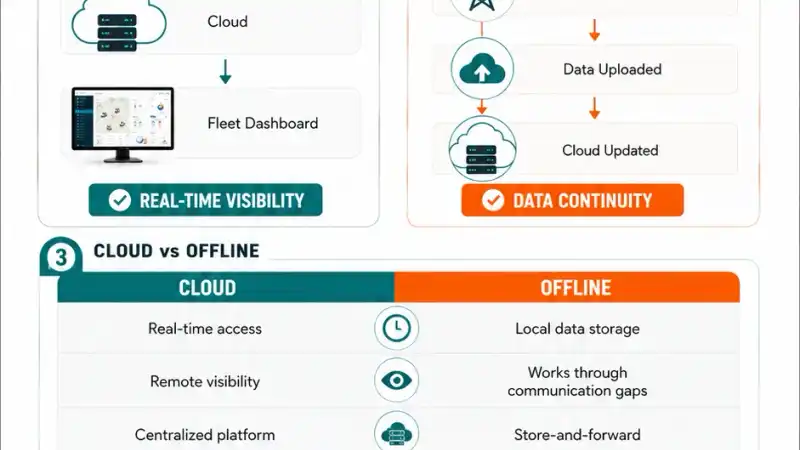
Data synchronization occurs when an offline-capable GPS tracker reconnects to the communication network and uploads previously stored records to the remote platform. The platform then incorporates the received data into the vehicle's historical record.
During Connectivity
Device → Cloud. Data is transmitted normally.
During Connectivity Loss
Device → Local Storage. Data is temporarily retained.
After Connectivity Returns
Local Storage → Cloud. Stored records are uploaded.
Final Stage
Cloud → Dashboard. Historical records become available to authorized users.
The exact synchronization method depends on the device and platform architecture. Some systems transmit stored records sequentially, while others batch-upload accumulated information.
What Does "Offline" Actually Mean?
The term offline tracking can be misunderstood. It does not necessarily mean that the entire GPS tracking system is offline. Instead, different parts of the system can have different connectivity states:
| Component | Status |
|---|---|
| GPS positioning | Available |
| Vehicle tracking device | Operating |
| Cellular communication | Temporarily unavailable |
| Local storage | Operating |
| Cloud platform | Operating |
| Fleet manager dashboard | Connected to cloud |
| New vehicle data | Not currently arriving |
This distinction is important when evaluating tracking systems. The device may continue functioning even though the cloud platform temporarily cannot receive its latest data.
Why Offline Capability Matters for Certain Fleets
Offline tracking capability is particularly valuable for fleets operating in areas where cellular connectivity can be intermittent. It helps preserve vehicle journey data during communication gaps and reduces the risk of missing historical records. Potential use cases include vehicles operating through:
- Remote highways
- Rural regions
- Tunnels
- Underground facilities
- Industrial sites
- Areas with inconsistent cellular coverage
For these fleets, continuous communication cannot always be guaranteed. Offline data retention provides an additional layer of resilience.
Advantages and Limitations Compared
| Area | Cloud GPS Tracking | Offline Tracking |
|---|---|---|
| Primary Strength | Remote visibility | Data continuity |
| Real-Time Monitoring | Excellent when connected | Not available during communication gap |
| Historical Data | Strong | Strong after synchronization |
| Network Dependency | High for live transmission | Reduced during temporary outages |
| Local Storage | Platform dependent | Required |
| Remote Access | Yes | Not for unsynchronized data |
| Best Environment | Reliable connectivity | Intermittent connectivity |
| Main Limitation | Connectivity interruptions affect live data | No live remote visibility during outage |
This makes the comparison less about choosing one technology over the other and more about determining whether a tracking architecture should support offline resilience alongside cloud visibility.
Cloud and Offline Tracking Can Work Together
Cloud and offline GPS tracking can operate together. Cloud connectivity provides centralized real-time visibility when communication is available, while offline storage preserves vehicle data during temporary communication gaps and enables later synchronization. For many commercial fleets, this combined model provides the strongest architecture:
Normal Operation
GPS Device → Network → Cloud → Dashboard
Connectivity Interruption
GPS Device → Local Storage
Connectivity Restored
Local Storage → Network → Cloud → Dashboard
This provides both real-time visibility and historical data resilience, rather than forcing businesses to choose between the two.
When Is Cloud GPS Tracking the Better Choice?
Cloud GPS tracking is ideal for fleets that need centralized, remotely accessible vehicle data, real-time monitoring, alerts, dashboards, and reporting. It works best when vehicles operate in areas with reliable communication connectivity. Typical requirements include:
- Live vehicle visibility
- Centralized fleet dashboards
- Remote access
- Real-time alerts
- Trip monitoring
- Historical reporting
- Multiple users accessing the same data
For example, a logistics company operating across multiple cities can use a cloud platform to give its operations team centralized visibility into vehicles across different locations. The major advantage is accessibility: fleet data isn't restricted to a particular office or computer.
When Is Offline Tracking Capability Important?
Offline tracking capability is important when vehicles regularly operate in areas with intermittent cellular connectivity. It allows tracking devices to retain location records during communication gaps and synchronize the information after connectivity is restored. Consider fleets operating through:
- Remote highways
- Rural areas
- Tunnels
- Mining sites
- Large industrial facilities
- Underground environments
- Poor-coverage regions
In these situations, the primary concern isn't necessarily whether the GPS device can determine its position. The concern is whether the vehicle data can reach the remote platform at that moment. If the answer is no, local storage and later synchronization preserve the journey information.
Which One Should You Choose?
Cloud GPS tracking should be prioritized when real-time remote visibility is the main requirement. Offline capability should be prioritized when vehicles frequently experience connectivity interruptions. For many commercial fleets, the strongest solution combines cloud tracking with offline data storage and synchronization.
| Your Requirement | Recommended Capability |
|---|---|
| Real-time vehicle monitoring | Cloud GPS Tracking |
| Remote fleet dashboard | Cloud GPS Tracking |
| Centralized reporting | Cloud GPS Tracking |
| Real-time alerts | Cloud GPS Tracking |
| Intermittent network coverage | Offline Capability |
| Remote-area operations | Offline Capability |
| Preserve data during outages | Offline Capability |
| Historical journey recovery | Offline Capability |
| Both live visibility and resilience | Cloud + Offline |
Common Mistakes When Evaluating Cloud and Offline GPS Tracking
Mistake 1: Assuming "Offline" Means No GPS
This is incorrect. GPS positioning and cellular/cloud communication are different functions. A tracker may still determine its position while temporarily being unable to transmit that information.
Mistake 2: Assuming Cloud Tracking Means Connectivity Is Always Guaranteed
Cloud platforms depend on data reaching the cloud. If the communication link is unavailable, new vehicle information cannot be displayed remotely until the connection resumes. This is why offline storage can be an important complementary capability.
Mistake 3: Treating Cloud and Offline as Opposites
A modern tracking solution doesn't necessarily need to choose between the two. The stronger architecture is cloud connectivity plus local storage plus automatic synchronization — cloud provides live visibility, and offline capability provides data continuity.
Mistake 4: Ignoring the Operating Environment
A fleet operating entirely within strong cellular coverage has different requirements from one travelling through remote regions. Before selecting a solution, evaluate routes, geographic coverage, network availability, connectivity interruptions, required data retention, and real-time monitoring requirements.
Buyer Checklist
Before selecting a GPS tracking architecture, ask:
Connectivity
- Do vehicles regularly enter low-coverage areas?
- Do routes include tunnels or remote regions?
- Is continuous cellular connectivity realistic?
Visibility
- Is real-time monitoring essential?
- Do multiple users need remote dashboard access?
- Are real-time alerts important?
Data Continuity
- Must journey records be preserved during network outages?
- Is historical trip reconstruction important?
- Does the device support local data storage?
Synchronization
- Does stored data automatically upload after connectivity returns?
- How much data can the device retain?
- How is historical data handled after synchronization?
The answers determine whether basic cloud connectivity is sufficient or whether offline/store-and-forward capability should be a mandatory requirement.
Final Thoughts
Cloud GPS tracking and offline tracking solve two different parts of the same operational problem. Cloud connectivity gives fleet managers remote access, live vehicle visibility, centralized data, real-time alerts, and reporting. Offline capability provides data retention during communication gaps, journey continuity, historical recovery, and automatic synchronization after reconnection.
The strongest architecture for many commercial fleets isn't cloud versus offline. It is cloud when connected, offline storage when disconnected, and synchronization when connectivity returns.
For fleets operating primarily in areas with reliable connectivity, cloud-based GPS tracking may provide everything required. For fleets travelling through remote or intermittently connected environments, offline capability becomes an important resilience feature. Businesses evaluating a GPS tracking system should therefore look beyond the dashboard interface and understand how the underlying platform handles connectivity interruptions and historical data recovery.
Frequently Asked Questions
Ready to get started?
Contact Yatis Telematics to learn how a cloud GPS tracking platform with offline data resilience can keep your fleet records complete.
Contact Us →