

GPS Tracking Alerts Every Fleet Should Enable for Better Safety and Fleet Control

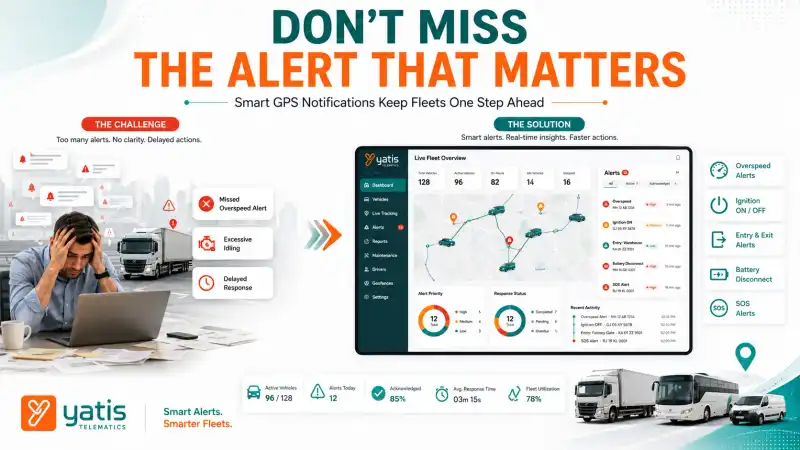
Knowing where a vehicle is only provides part of the operational picture. Fleet managers also need to know when something important happens. This is where GPS tracking alerts become valuable.
Instead of constantly monitoring a dashboard, businesses can configure their GPS tracking system to automatically notify them whenever predefined events occur. These real-time notifications help managers respond quickly, improve operational visibility, and focus attention on the events that matter most.
Quick Takeaways
- Detect important vehicle events instantly
- Reduce response time
- Improve fleet visibility
- Monitor vehicle activity
- Configure alerts based on business needs
- Reduce unnecessary manual monitoring
- Improve operational efficiency
At a Glance
| Alert Type | Operational Benefit |
|---|---|
| Overspeed Alert | Improves speed compliance |
| Idling Alert | Identifies excessive idle time |
| Ignition Alert | Tracks vehicle usage |
| Entry/Exit Alert | Monitors important locations |
| Battery Alert | Detects power interruptions |
| Maintenance Reminder | Supports scheduled servicing |
What Are GPS Tracking Alerts?
GPS tracking alerts are automated notifications generated by a GPS tracking system when specific vehicle events occur. These alerts help fleet managers monitor operational activities without continuously watching live vehicle locations.
Alerts are created using predefined rules. When a rule is triggered, the platform records the event and sends a notification through the configured communication channel — dashboard notifications, mobile applications, email, SMS, or push notifications. The objective isn't to create more notifications; it's to ensure managers receive the right information at the right time.
Why Alert Configuration Matters
Too many alerts create unnecessary distractions. Too few alerts reduce operational visibility. Effective alert configuration balances operational awareness with notification relevance. Fleet managers should configure alerts based on fleet size, vehicle type, business operations, risk profile, and operational priorities. A well-designed alert strategy ensures that notifications support decision-making instead of overwhelming fleet operators.
1. Overspeed Alerts
Overspeed alerts notify fleet managers when a vehicle exceeds a predefined speed threshold, helping businesses identify speeding events and improve operational oversight. They are among the most commonly used GPS tracking notifications.
Rather than reviewing speed reports after a trip has finished, managers receive immediate visibility when speed thresholds are exceeded. Benefits include improved operational awareness, faster intervention, consistent speed monitoring, and better fleet reporting. Overspeed thresholds should reflect vehicle type, operating environment, and organizational policies rather than using a single limit for every vehicle.
2. Idling Alerts
Idling alerts identify vehicles that remain stationary with the engine running beyond a predefined time, helping fleet managers monitor unnecessary idle periods. Excessive idling increases operating costs and reduces efficiency.
Typical uses include monitoring service vehicles, reducing unnecessary engine operation, supporting operational reviews, and improving resource utilization. Alert thresholds should vary depending on fleet operations rather than applying the same duration across all vehicles.
3. Ignition Alerts
Ignition alerts notify fleet managers whenever a vehicle's ignition is switched on or off, improving visibility into vehicle usage and operational activity. Ignition notifications help organizations understand when vehicles begin operating, when trips end, after-hours vehicle usage, and unexpected vehicle activity. These alerts are particularly useful for fleets where vehicle availability and usage require close monitoring.
4. Entry and Exit Alerts
Entry and exit alerts notify fleet managers whenever a vehicle enters or leaves a predefined location. These alerts improve operational visibility by automatically recording vehicle movement at important business sites.
Rather than manually checking whether vehicles reached a customer location or returned to the depot, the system automatically records these events whenever a vehicle crosses a predefined virtual boundary. Common business applications include warehouse arrival, depot departure, customer site verification, construction project monitoring, service center visits, and restricted area monitoring.
Entry and exit alerts become even more powerful when combined with properly designed geofences. To understand how virtual boundaries work and how to create them effectively, read our guide on geofencing explained for fleet managers.
5. Battery Disconnect Alerts
Battery disconnect alerts notify fleet managers when a GPS tracking device loses its primary power source, helping identify possible tampering, maintenance issues, or unexpected power interruptions.
GPS tracking depends on continuous power. If the tracker is disconnected from the vehicle's battery, managers should know immediately. Battery alerts help identify device tampering, unauthorized disconnection, electrical faults, maintenance-related power interruptions, and unexpected battery failures. Early detection helps reduce periods where vehicle visibility may be affected.
6. Tow Alerts
Tow alerts notify fleet managers when a vehicle moves while the ignition remains off, helping improve visibility into unauthorized vehicle movement and supporting asset security.
Vehicles don't always move because someone is driving them. Typical scenarios include vehicle towing, unauthorized relocation, parking area movement, recovery operations, and equipment transportation. For organizations managing high-value commercial vehicles, tow alerts provide an additional layer of operational awareness.
7. Maintenance Reminder Alerts
Maintenance reminder alerts help businesses stay informed about upcoming service intervals by generating notifications based on mileage, operating hours, or scheduled maintenance periods.
Preventive maintenance depends on timely action. GPS tracking platforms often allow maintenance reminders based on distance travelled, engine operating hours, calendar schedules, service intervals, and inspection schedules. Rather than replacing maintenance management systems, these reminders help fleet managers stay aware of upcoming servicing requirements.
8. Panic (SOS) Alerts
Panic alerts allow drivers to immediately notify fleet managers during emergencies, helping organizations respond more quickly to unexpected situations involving vehicles or personnel.
Many commercial fleets operate in remote or high-risk environments. Typical use cases include medical emergencies, vehicle breakdowns, personal safety concerns, security incidents, and remote location assistance. When integrated into a GPS tracking platform, panic alerts provide both the emergency notification and the vehicle's current location, allowing managers to coordinate a faster response.
9. Configure Alerts Without Creating Alert Fatigue
The most effective GPS tracking alerts focus on high-priority operational events. Configuring too many notifications can overwhelm fleet managers and reduce the effectiveness of the alert system. If managers receive hundreds of notifications each day, important events can easily be overlooked. To reduce alert fatigue:
- Prioritize business-critical events
- Configure realistic thresholds
- Assign alerts to the appropriate teams
- Review alert performance regularly
- Disable unnecessary notifications
- Adjust thresholds as operations evolve
The goal is to ensure alerts support faster decision-making, not create unnecessary distractions.
10. Improve Fleet Performance with Alert Analytics
GPS tracking alerts help fleet managers improve operational performance by converting real-time notifications into actionable insights. Receiving alerts is only the first step — the real value comes from analyzing alert history to understand patterns across the fleet.
A modern GPS tracking platform allows fleet managers to answer questions such as:
- Which vehicles trigger the most overspeed alerts?
- Which drivers frequently exceed idle limits?
- Which depots generate the highest number of entry and exit events?
- Which vehicles experience repeated battery disconnects?
- Which alerts require operational changes rather than individual intervention?
Instead of treating alerts as isolated events, businesses should review alert trends to improve long-term operational performance. When combined with a GPS tracking system, alert analytics become part of a centralized dashboard that supports proactive fleet management rather than reactive monitoring.
GPS Tracking Alerts vs Their Business Benefits
| GPS Tracking Alert | Business Benefit |
|---|---|
| Overspeed Alert | Improves speed compliance |
| Idling Alert | Identifies unnecessary idle time |
| Ignition Alert | Tracks vehicle usage |
| Entry/Exit Alert | Verifies site activity |
| Battery Disconnect Alert | Detects device tampering or power loss |
| Tow Alert | Identifies unauthorized movement |
| Maintenance Reminder | Supports preventive servicing |
| Panic (SOS) Alert | Enables faster emergency response |
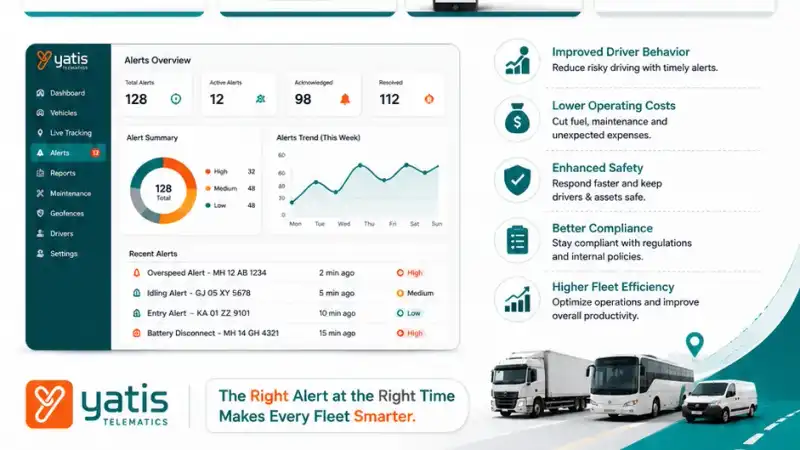
Recommended Alert Priority Levels
Not every alert requires the same urgency.
High Priority
Panic (SOS), battery disconnect, tow alert, and unauthorized movement.
Medium Priority
Overspeed, ignition, entry/exit, and excessive idling.
Low Priority
Maintenance reminders, daily summaries, and operational reports.
Organizing alerts by priority helps fleet managers focus on critical events first while still maintaining visibility into routine operations.
Common Mistakes When Configuring GPS Alerts
Alerts should help managers focus on meaningful operational events, not overwhelm them. Avoid these common mistakes:
1. Enabling Every Available Alert
Many GPS platforms offer dozens of alert types. Enabling all of them often results in hundreds of notifications each day. Instead, start with business-critical alerts such as overspeed, ignition, entry/exit, battery disconnect, and panic (SOS). Additional alerts can be introduced gradually as operational requirements grow.
2. Using the Same Threshold for Every Vehicle
Different vehicles operate under different conditions. Heavy trucks may require different speed thresholds than service vans, construction equipment may have different idle time expectations than delivery vehicles, and school buses may require stricter speed policies than freight vehicles. Alert thresholds should reflect operational realities.
3. Ignoring False or Repeated Alerts
If alerts trigger too frequently without requiring action, managers may begin ignoring notifications altogether. Regularly review trigger frequency, alert accuracy, operational relevance, and response effectiveness. Fine-tuning alert rules improves both reliability and user confidence.
4. Treating Every Alert as Equally Important
Not every notification requires immediate attention. Critical alerts such as panic (SOS), battery disconnect, and unauthorized movement should receive higher priority than routine operational reminders.
5. Never Reviewing Alert Configuration
Fleet operations change over time. New vehicles, routes, depots, customer locations, and business processes may require updates to existing alert rules. Reviewing alert configurations periodically ensures they continue to support current operational needs.
GPS Alert KPIs Every Fleet Manager Should Monitor
| KPI | Why It Matters |
|---|---|
| Overspeed Events | Measures speed compliance |
| Idle Alert Frequency | Identifies unnecessary engine operation |
| Ignition Events | Tracks vehicle utilization |
| Entry/Exit Events | Verifies operational activity |
| Alert Response Time | Measures operational responsiveness |
| Critical Alert Resolution | Tracks issue management |
| False Alert Rate | Helps optimize alert settings |
| Alerts per Vehicle | Identifies recurring operational issues |
| Monthly Alert Trends | Supports continuous improvement |
Monitoring these KPIs helps organizations evaluate whether alerts are delivering meaningful operational value rather than simply generating notifications.
GPS Tracking Alert Configuration Checklist
Review your current configuration:
- Overspeed alerts are enabled
- Idling alerts use realistic thresholds
- Ignition notifications are active
- Entry and exit alerts are configured for important business locations
- Battery disconnect alerts are enabled
- Panic (SOS) alerts are tested regularly
- Alert priorities are clearly defined
- Alert settings are reviewed periodically
If several of these items are missing, your fleet may not be getting the full operational value from its GPS tracking system.
Final Thoughts
GPS tracking alerts transform passive location monitoring into proactive fleet management. Rather than continuously watching dashboards, fleet managers receive timely notifications when important operational events occur.
By prioritizing high-value alerts, configuring realistic thresholds, and reviewing alert performance regularly, businesses can improve visibility, respond faster to operational issues, and reduce unnecessary manual monitoring. Location-based alerts become especially valuable when combined with well-designed geofences, allowing organizations to automate site monitoring and improve operational accountability.
At Yatis, our GPS tracking system and fleet management platform provide configurable real-time alerts that help businesses monitor vehicles more effectively, improve operational awareness, and make faster, data-driven decisions.
Frequently Asked Questions
Ready to get started?
Contact Yatis Telematics to configure real-time GPS tracking alerts that match how your fleet actually operates.
Contact Us →