

How to Choose a Connected Battery Solution: 7 Things Battery Manufacturers and EV OEMs Should Evaluate

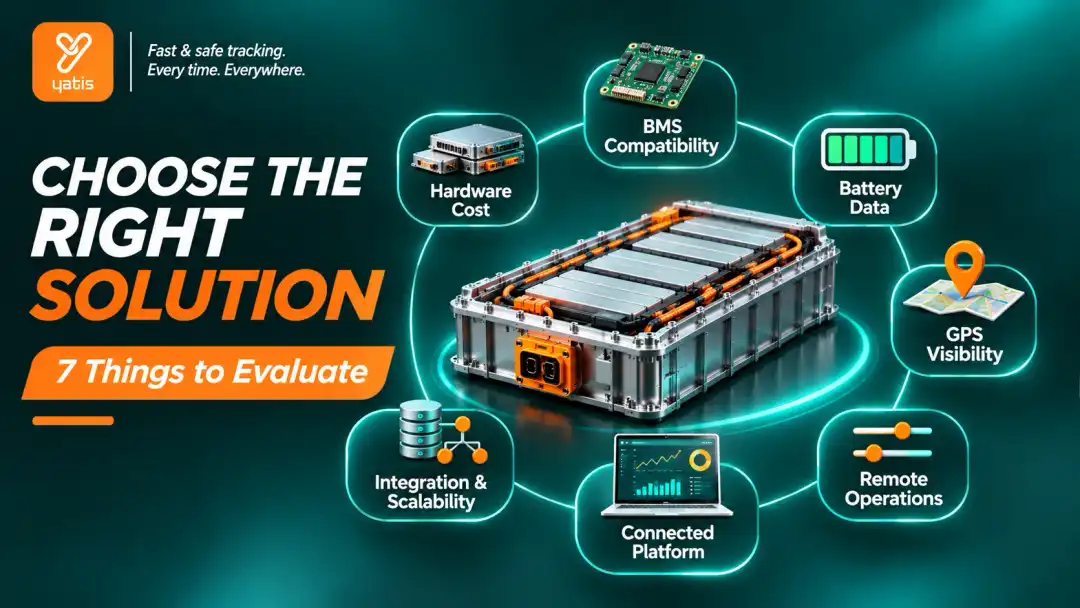
A connected battery solution is more than a device that sends battery readings to a dashboard. For battery manufacturers and EV OEMs, the right choice should fit the battery management system, provide useful operational visibility, integrate with existing workflows and make commercial sense at scale.
Evaluate the complete system—not just the hardware quote.
Compare the BMS interface, data quality, connectivity, GPS requirements, remote-operation safeguards, platform usability and integration effort before selecting a battery IoT solution.
As electric mobility and connected energy systems expand, battery manufacturers and EV OEMs need better visibility into battery condition and field performance. A suitable connected battery solution can help bring battery information and vehicle or asset context into one operational view. But solutions can differ significantly in the BMS interfaces they support, the parameters they expose, the connectivity they use and the way they fit into an OEM’s systems.
This guide sets out seven practical evaluation areas. Use them to structure vendor discussions, technical validation and total-cost comparisons. For background on the underlying architecture, see our guide to connected battery monitoring, SoC, cell voltage and temperature.
At a glance: the seven evaluation criteria
Total hardware cost
Compare the complete device and BMS configuration—not one component in isolation.
BMS compatibility
Confirm interface, protocol, data mapping and compatibility with the exact BMS model.
Battery data quality
Check which parameters are available, how frequently they update and how gaps are handled.
GPS and asset visibility
Establish whether location and battery status need to be viewed together.
Remote operations
Understand supported commands, permissions, safeguards and audit trails.
Platform and usability
Assess dashboards, alerts, fleet views, reports and role-based access.
Integration and scale
Validate APIs, deployment effort, support and performance as deployments grow.
1. Evaluate the total hardware cost per battery
Hardware pricing is an important starting point, especially when a manufacturer is planning hundreds or thousands of connected batteries. However, comparing only the IoT device price can create an incomplete picture. The BMS interface, wiring, installation, configuration and any required gateway components can all affect the final cost.
Ask vendors to provide a like-for-like bill of materials for the exact battery and BMS configuration being evaluated. Separate one-time hardware and installation charges from recurring connectivity, software or platform fees.
Illustrative hardware comparison from the supplied Yatis reference configuration
Reference figures supplied for the earlier Yatis comparison: CAN BMS ₹3,500 + IoT device ₹2,500; Yatis UART BMS ₹1,250 + IoT device ₹2,200. These are configuration-specific illustrative hardware figures, not a universal market price comparison.
On the supplied figures, the reference configuration totals ₹6,000 and the Yatis UART configuration totals ₹3,450—a difference of ₹2,550 per deployment, or 42.5% of the reference total. At scale, that difference can be material. Still, verify that both configurations meet the same technical requirements and compare excluded costs such as taxes, installation, connectivity and platform fees.
For a deeper breakdown, read UART vs CAN-based BMS: understanding the hardware cost difference and use the connected battery cost calculator to model different deployment volumes.
2. Confirm BMS compatibility before committing
BMS compatibility is one of the most important technical checks. A connected device can only report the information that it can reliably read from the battery management system. Do not assume that every BMS exposes the same protocol, register map or set of parameters.
Ask the vendor to validate the exact BMS make, model, firmware version and communication interface used in your battery. Confirm whether the solution uses UART, CAN or another interface, and whether any protocol mapping, firmware work or additional hardware is required.
- Which BMS models and firmware versions have been tested?
- Which communication interface and protocol are supported?
- Is the protocol documentation available, or is vendor-specific mapping required?
- What happens if the BMS firmware or data map changes?
- How are missing, invalid or out-of-range readings identified?
For a technical overview of battery-monitoring design considerations, consult resources from Texas Instruments’ battery management portfolio. Use manufacturer documentation for the specific BMS in your product as the final compatibility reference.
3. Check the battery data—not just the dashboard
A useful battery IoT solution should make relevant BMS information accessible in a form that operations and engineering teams can interpret. The exact data set depends on the BMS and the battery design, so ask for a parameter-level data sheet rather than relying on a generic feature list.
| Data point | Why it matters | What to verify |
|---|---|---|
| State of Charge (SoC) | Indicates the reported remaining charge. | Source, update interval, units and calibration context. |
| Cell voltage | Helps teams inspect cell-level voltage information where exposed by the BMS. | Individual cell availability, min/max values and missing-cell handling. |
| Temperature | Provides visibility into reported battery temperature readings. | Sensor count, sensor locations and update frequency. |
| BMS settings and status | Can help teams understand selected configuration and operating information. | Which settings are readable and whether access is read-only. |
Also evaluate data freshness, timestamping, storage history, alert thresholds and how the platform handles connectivity interruptions. A dashboard showing a value is not enough; teams should know when it was last received and whether it is current.
Explore the fundamentals in our connected battery monitoring guide. For a broader technical reference, TI’s battery management overview explains the role of battery monitoring and management components.
4. Decide whether GPS visibility is part of the requirement
For batteries deployed inside vehicles or mobile assets, battery condition may be only one part of the operational picture. GPS visibility can help teams relate battery information to the location of the vehicle or asset—provided the use case requires location tracking and the device is designed and installed to support it.
Clarify whether you need battery monitoring alone, GPS tracking alone or both in one connected setup. If both are required, ask whether the platform can show the battery and location information against the same vehicle or asset record.
- Is GPS required for every deployment, or only selected vehicle categories?
- Can users view battery status and the associated asset location together?
- What location update behaviour is supported under normal network conditions?
- How are asset identity, device identity and battery identity mapped?
Yatis’ connected solution material describes battery monitoring alongside GPS location and driving-behaviour visibility. Review the use case in Beyond battery monitoring: GPS tracking and remote battery control, and confirm the exact features and hardware configuration applicable to your deployment.
5. Understand remote operations, permissions and safeguards
Some connected battery deployments may require remote operations in addition to monitoring. Before evaluating remote commands, obtain a precise list of supported actions for the target BMS and understand the conditions under which each action can be executed.
Remote enable/disable or other BMS-supported commands should not be treated as interchangeable with a safety-rated control, emergency stop or certified vehicle immobiliser. Their availability and behaviour depend on the BMS, device integration, vehicle architecture and operating rules.
Ask vendors to demonstrate:
- Which commands are supported for the exact BMS model.
- Which user roles can initiate a command and who can approve it.
- How command requests, acknowledgements, failures and timeouts are logged.
- What happens if the device is offline or the BMS does not respond.
- What operational and safety review is required before enabling remote control.
6. Evaluate the connected battery platform for day-to-day use
The platform is where data becomes operationally useful. Battery engineers, service teams, fleet operators and management may need different views of the same deployment. Evaluate the platform using the tasks your teams actually perform rather than judging it only by its dashboard appearance.
- Asset overview: Can users identify each battery, vehicle or deployed asset?
- Battery visibility: Are the required SoC, voltage, temperature and BMS fields presented clearly?
- Alerts: Can teams configure relevant thresholds and route notifications to the right people?
- History: Can users review historical readings and investigate an event over time?
- Access: Are roles and permissions suitable for engineering, operations and management?
- Reports: Can teams export or share the information they need for service and operational reviews?
Ask for a role-based demonstration using realistic sample assets and real operating workflows. Confirm which functions are included in the proposed platform package and which may require additional configuration or commercial terms.
7. Validate integration effort and the ability to scale
A pilot may involve a handful of batteries, while a production programme may involve multiple battery variants, vehicle models, plants, service partners and geographic regions. The solution should be evaluated against the deployment you intend to operate—not only the first batch.
Discuss integration with the systems your organisation already uses, such as fleet platforms, enterprise resource planning (ERP), manufacturing systems, service-management tools or customer portals. If APIs or data exports are required, ask for documentation and a technical walkthrough before final selection.
- Are documented APIs or data-export options available for the required use cases?
- Can the platform map multiple battery models and asset types?
- What provisioning, installation and commissioning steps are needed per unit?
- How are device replacement, firmware updates and field troubleshooting handled?
- What support model, service levels and escalation process are offered?
- Can the vendor support the expected device count and geographic footprint?
For organisations assessing connected fleet operations alongside battery intelligence, explore the wider Yatis telematics platform and its resource library for related use cases.
Build a vendor scorecard before making the decision
Use the following scorecard to compare shortlisted vendors consistently. Score each category from 1 (not demonstrated) to 5 (fully demonstrated and documented). Add your own weighting based on product requirements, deployment scale and operational risk.
| Evaluation area | Evidence to request | Suggested weight | Score (1–5) |
|---|---|---|---|
| Hardware cost | Itemised quote and total cost per deployed battery | 15% | _____ |
| BMS compatibility | Test evidence for exact BMS model and firmware | 20% | _____ |
| Battery data | Parameter list, sample payload and update behaviour | 15% | _____ |
| GPS visibility | Location demonstration and asset mapping | 10% | _____ |
| Remote operations | Supported command matrix and safeguards | 10% | _____ |
| Platform usability | Role-based workflow demonstration | 15% | _____ |
| Integration and scale | API documentation, deployment plan and support model | 15% | _____ |
Weights are an illustrative starting point, not a universal benchmark. Adjust them to reflect your organisation’s technical and commercial priorities.
Questions to ask during a connected battery solution demo
- Can you demonstrate the solution with our exact BMS make, model and firmware?
- Which battery parameters are available, and what is their actual update frequency?
- Can we see the timestamp and data-quality status for each reading?
- What is the complete per-unit hardware cost, and what recurring charges apply?
- Can battery information and GPS location be associated with the same asset?
- Which remote commands are supported, and what permissions and safeguards apply?
- What APIs, deployment support and service processes are available for production scale?
How Yatis approaches connected battery visibility
Yatis’ connected battery solution is designed around a compatible BMS-to-IoT data path, with battery information transmitted through an IoT device and cellular connectivity to a connected platform. The supplied solution material identifies visibility into parameters such as SoC, cell voltage, temperature and BMS settings, with GPS location and supported remote BMS operations available in relevant configurations.
Compatibility and feature availability depend on the BMS model, interface, device configuration and deployment requirements. Battery manufacturers and EV OEMs should validate their exact hardware and operational use case with the Yatis team before finalising a specification.
Planning a connected battery deployment?
Start with your BMS model, required battery parameters, GPS needs, remote-operation requirements and expected deployment volume. These details make a technical and commercial evaluation far more precise.
Visit Yatis or explore the Yatis resource library to learn more about connected telematics use cases.
Frequently asked questions
What is a connected battery solution?
A connected battery solution combines a battery management system interface, an IoT communication device, a network connection and a software platform to make supported battery information available remotely. The exact features depend on the BMS, hardware and platform configuration.
Why is BMS compatibility important?
The BMS is the source of battery operating information. If the connected device cannot communicate with the specific BMS protocol and data map, it may not be able to retrieve the required parameters reliably. Validate the exact BMS model and firmware before deployment.
Which battery parameters should an EV OEM monitor?
Commonly evaluated parameters include State of Charge, cell voltage and temperature. The availability and granularity of these readings depend on the BMS and battery design. OEMs should define the required data set with their engineering teams.
Does a connected battery solution always include GPS tracking?
No. Some deployments require battery monitoring only, while others also need GPS visibility for the vehicle or asset. Confirm whether GPS is included in the proposed hardware and platform configuration.
Can a connected battery platform support remote battery control?
Some configurations may support remote commands exposed by a compatible BMS. The available commands, permissions and safeguards must be confirmed for the exact system. Remote commands should not be assumed to be a safety-rated control or certified immobilisation feature.
How should manufacturers compare connected battery solution costs?
Compare the complete hardware configuration and include installation, connectivity, platform fees, integration, support and maintenance where applicable. Make sure the shortlisted solutions meet the same BMS and data requirements before comparing price.
Can one connected battery platform support multiple battery models?
That depends on supported BMS interfaces, protocols, data maps and platform configuration. Ask the vendor to demonstrate each battery variant or provide a documented compatibility and onboarding plan.